
Schema has created a standard in website coding which enables developers to provide additional information to search engines under the form of code. This information includes snippets such as reviews, pricing, etc.
Schema Markups that can be used give below are the most important ones for an eCommerce Website:
1. Product:
The Schema Markup type “Product” tells the search engine the webpage it is reading is offering a product. Even though it is not visible in the rich snippet, the “Product” is the most important Markup for an eCommerce website as it defines the web page.
2. Name and Brand/Organization Name:
Name and Branding are also important for the invisible Schema Markup properties “Name “and “Brand “.
Please Note: “Brand” can also be used as value for different types.
3. Price, Offer, and Currency:
To attract your customer need to tell your customer your offer price and the currency. These are visible Schema Markup and their output can be seen in the rich snippet in Search Engine Result Pages.

4. Sales:
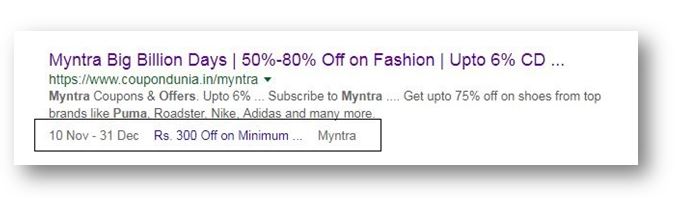
E-commerce websites make a big buck through Limited-time offers and Sales. The type “SaleEvent” helps you display your mouthwatering sales to the customers in your rich snippet on Search Engine Result Pages. This Markup increases your eCommerce website’s Click Through Rate.
5. Product availability:
Schema markup “InStock ” allows you to show the product availability on your eCommerce website through rich snippet on Search Engine Result Pages.

6. Review and ratings:
To generate review and rating rich snippet for your eCommerce website on Search Engine Result Pages you need the Schema Markup Review and AggregateRating.
“AggregateRating” displays an average rating based on multiple ratings or reviews on your product webpage.

The “Review” Markup is an invisible one mainly and it communicates to the search engine page that their reviews on the product webpage of your eCommerce website.
7. Search Box:
Search Box in Google Search Engine Result Pages is the new thing trending these days. It can be made possible by implementing the Schema Markup SearchAction, to your eCommerce website home page.

8. Limited-time offers
Sometimes a single product is connected with multiple offers. In such case, the Schema Markup type “AggregateOffer ” can be used to display the range in the Rich Snippet on Search Engine Result Pages.

After that, you need to check the schema whether it’s validated or showing error in the Structure data testing tool.
Structure data testing tool: https://search.google.com/structured-data/testing-tool
Schema Markup is Available for Product
Add markup to your product pages so Google can provide detailed product information in rich Search results including Google Images. Users can see price, availability, and review ratings right on Search results.

Schema Compatibility with E-commerce
Here is list of the E-Commerce plugin for WordPress users.
- Woo-commerce
- Easy Digital Downloads
- MemberPress
1. WooCommerce
WooCommerce is the most popular WordPress eCommerce plugin. It is also the most popular E-Commerce platform in the world.
In this plugin currently, we have compatibility with woo-commerce.
Important Note:
If you have created custom plugin and you want set markup for this plugin then contact our support team.
That’s it for this tutorial!
We hope it helped you. If you have any feedback or questions or do you want us to create compatibility for any other schema type which isn’t listed in our plugin then you can request us we will surely implement it as soon as possible.
Just contact us here and we are always available for you.
