
Now we are providing WPGraphQL support by Schema & Structured Data for WP & AMP. You can query your schema data inside the GraphQL query, you can get the data from here.
For this two plugin must be activated Schema & Structured Data for WP & AMP and WPGraphQL
Once both the plugin activated the object will there. Select saswpSchema json id like below the screenshot.
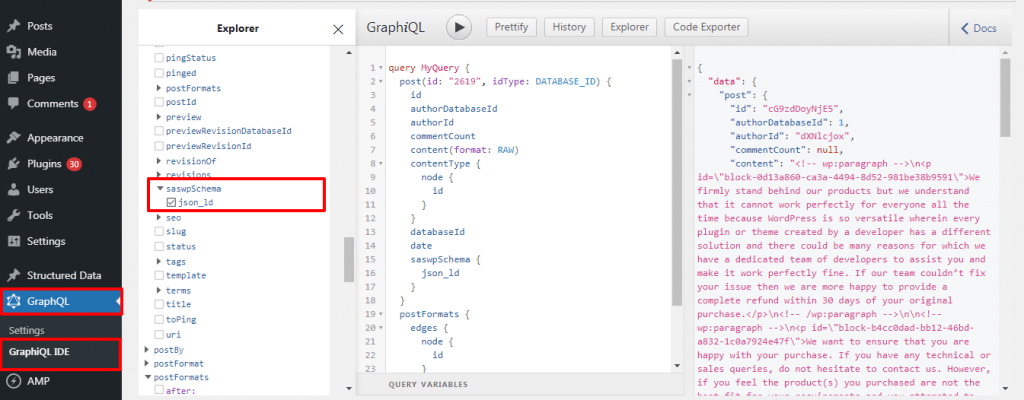
Currently returning Schema data for:
- Pages
- Posts
- Custom post types
- Products (WooCommerce)
- Categories
To query for the Schema Data simply add the saswpSchema object to your query:
Post Type Data
query GetPages {
    pages(first: 10) {
        edges {
            node {
                id
                title
                seo {
                    canonical
                    title
                    metaDesc
                    focuskw
                    metaRobotsNoindex
                    metaRobotsNofollow
                    opengraphAuthor
                    opengraphDescription
                    opengraphTitle
                    opengraphDescription
                    opengraphImage {
                        altText
                        sourceUrl
                        srcSet
                    }
                    opengraphUrl
                    opengraphSiteName
                    opengraphPublishedTime
                    opengraphModifiedTime
                    twitterTitle
                    twitterDescription
                    twitterImage {
                        altText
                        sourceUrl
                        srcSet
                    }
                    breadcrumbs {
                        url
                        text
                    }
                    cornerstone
                    schema {
                        pageType
                        articleType
                        raw
                    }
                    readingTime
                    fullHead
                }
                author {
                    node {
                        seo {
                            metaDesc
                            metaRobotsNofollow
                            metaRobotsNoindex
                            title
                            social {
                                youTube
                                wikipedia
                                twitter
                                soundCloud
                                pinterest
                                mySpace
                                linkedIn
                                instagram
                                facebook
                            }
                        }
                    }
                }
            }
        }
    }
}
That’s it for this tutorial!
We hope we’ve clear your doubts in case If you have any feedback or questions, Just contact us here and we are always available for you.
