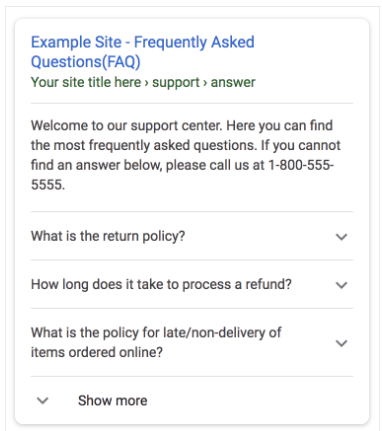
Creating an FAQ page with easy to understand questions and answers of structured data can be done with Divi builder.
FAQ Schema Markup widget automatically adds the structured data to the page, which makes it even easier for search engines to crawl, identify, and index the content. Let’s see how you can build an FAQ page with Divi builder for this follow the below steps.
Step 1 – On the top left side of the WordPress dashboard, click Pages > Add New
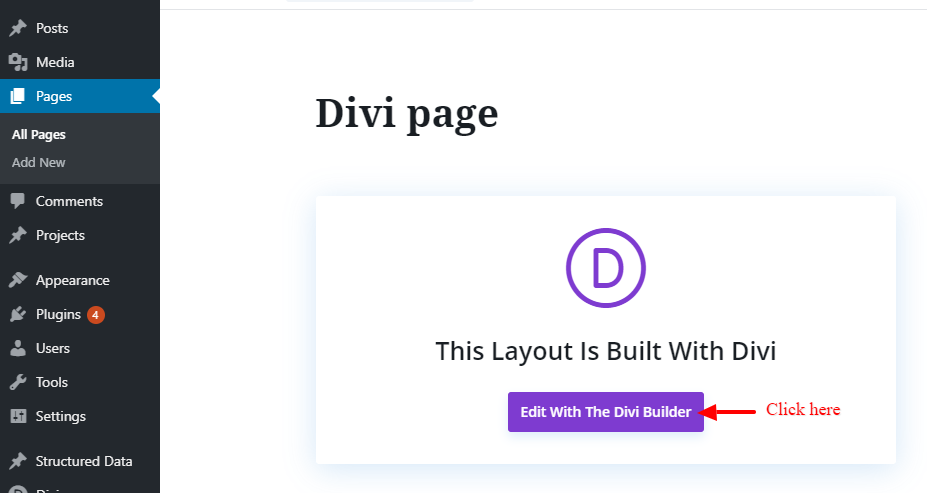
Step 2 – Edit a new page/post with Divi builder Go to “Pages” -> “Add new“. Then, click the “Edit with Divi Builder” button.
Step 3 – Once the page loads Divi builder, search for FAQ block from the Widgets panel and add it to the page.

Step 4 – After adding the FAQ widget to the page, you can add as many questions and answers as you need. like below the screenshot.

Step 5 – Once you are done, click on the “Save” button.
Step 6 – You can test it in the Structured Data Testing Tool will check your page’s markup and display the results or errors. Here’s what a successful test result looks like:

Step 7 – Test the FAQ in Google’s Rich Results Testing Tool